Production Planning in ERP: How Manufacturers Reduce Delays and Waste
|
Ambibuzz Team
Introduction
Your factory floor is busy. But orders are still late.
Raw materials run out mid-production. Workers sit idle waiting for parts. Finished goods pile up in the wrong quantities. Supervisors spend hours chasing updates across WhatsApp groups and spreadsheets.
Sound familiar?
This is not a people problem. It is a planning problem. And it is more common than most manufacturers admit.
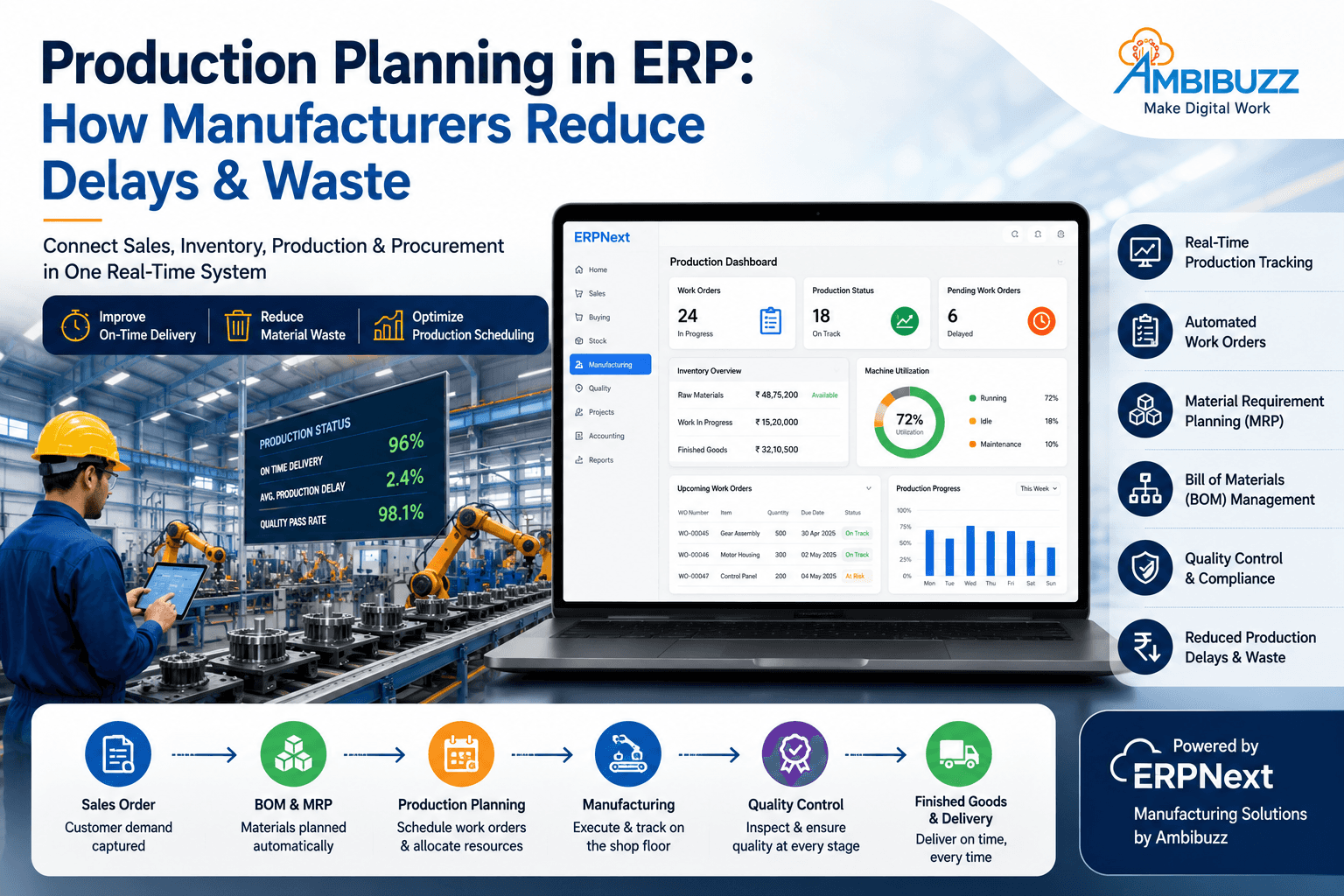
Production planning in ERP solves this at the root. It connects your sales orders, inventory, workforce, and machines into one live system. You see what is happening now — not what happened last week. You catch problems before they cause delays. You stop waste before it eats your margins.
This blog explains how production planning works inside an ERP system, what it covers, how it cuts delays and waste, and what growing manufacturers in India should look for.
Table Of Content
What Is Production Planning in ERP?
How Production Planning Works Inside an ERP
Production Planning Features in ERP: Comparison by Business Need
The Real Cost of Poor Production Planning
ERPNext for Manufacturing: What Ambibuzz Implements
What Manufacturers Tell Us Before vs After ERP
Key Takeaways
Production planning in ERP connects sales, inventory, machines, and workforce in one system — eliminating manual coordination.
ERP auto-generates Work Orders from sales demand, so your shop floor always knows what to produce and when.
Bill of Materials (BOM) in ERP ensures every production run uses the right materials in the right quantities.
ERP reduces material waste by triggering purchases only when production actually needs them — not based on guesswork.
Real-time work-in-progress (WIP) tracking stops delays from going unnoticed until it is too late.
Manufacturers using ERP for production planning report significant reductions in production delays, excess inventory, and overtime costs.
ERPNext, implemented by Ambibuzz, is purpose-built for manufacturing ERP in India — with BOM, Work Orders, Job Cards, and subcontracting built in.
What Is Production Planning in ERP?
Production planning is the process of deciding what to make, how much to make, when to make it, and with what resources.
Without ERP, this happens in silos. Sales tells production what customers want. Production asks stores for materials. Stores check manually. Procurement buys based on guesses. Production starts late. Delays happen.
Inside an ERP system, production planning is automated and connected. Every department sees the same data. Every decision is based on live information.
A good manufacturing ERP handles the full production lifecycle:
Demand forecasting from sales orders
Bill of Materials management
Work Order creation and scheduling
Resource and machine allocation
Real-time shop floor tracking
Quality control checkpoints
Finished goods and delivery planning
Many manufacturers in India still run production on Excel sheets, whiteboards, and phone calls. This creates predictable problems:
Stockouts mid-production. Materials run out because purchases were not timed to production schedules. Work stops. Deadlines slip.
Overbuying and excess inventory. To avoid stockouts, teams order more than needed. Capital gets locked. Warehouse space fills up. Expiry and obsolescence waste money.
No visibility into WIP. Supervisors do not know where an order is in production until someone physically checks. Problems surface too late to fix.
Unbalanced workloads. Some machines run at 100%. Others sit idle. Labour costs rise. Equipment maintenance gets skipped.
Last-minute schedule changes. A rush order from a big customer disrupts the entire production plan. Everything gets reshuffled manually. Chaos follows.
An ERP system eliminates all of these issues — not by adding more complexity, but by making the right information available to the right person at the right time.
How Production Planning Works Inside an ERP
Step 1: Sales Order Triggers Production Demand
When your sales team books an order, the ERP immediately calculates what needs to be produced. It checks your finished goods stock first. If stock is insufficient, it creates a Production Order automatically.
You do not wait for a production manager to read an email and manually create a plan. The system does it instantly.
Step 2: Bill of Materials (BOM) Drives Material Requirements
Every product in your ERP has a Bill of Materials — a structured list of every raw material, sub-assembly, and component needed to make it, including quantities and units.
When a Work Order is created, the BOM drives the Material Requirement Planning (MRP) process. The system calculates:
What materials are needed
How much is already in stock
What needs to be purchased
When purchases must arrive to meet the production schedule
This eliminates guesswork. Your purchase team gets accurate, timely purchase requests — not frantic last-minute calls.
Step 3: Work Orders and Job Cards Are Created
A Work Order is the master instruction for production. It tells your shop floor:
What to produce
In what quantity
By which date
Using which BOM version
Inside each Work Order, Job Cards are created for individual operations — cutting, welding, assembly, painting, QC, and so on. Each Job Card is assigned to a workstation or employee.
This gives you granular, real-time visibility into every step of production — not just the final output.
Step 4: Machine and Resource Scheduling
ERP shows you which machines are busy, which are free, and what their capacity is. You can schedule Work Orders against actual capacity — not wishful thinking.
If Machine A is running at full capacity for the next 3 days, the ERP flags this. You can reschedule, add a shift, or divert to Machine B. You make that decision before a delay happens — not after.
Step 5: Real-Time Shop Floor Tracking
As production progresses, workers update Job Cards. Supervisors see live WIP status on their dashboards. Managers know exactly how many units are in which stage.
If a stage falls behind, the system alerts the right person. Corrective action is faster. Delivery commitments stay intact.
Step 6: Quality Control Checkpoints
ERP integrates quality inspection at defined stages — incoming material QC, in-process QC, and final goods QC. Failed items are flagged immediately. Rejection rates are tracked. Root causes become visible over time.
This is how manufacturers reduce waste from defects — not by inspecting more, but by catching problems earlier.
Step 7: Finished Goods and Delivery Planning
Once production is complete, the ERP updates your finished goods inventory in real time. It links back to the original sales order. Dispatch is triggered. Customers get accurate delivery timelines.
Every step is connected. Nothing falls through the cracks.
Production Planning Features in ERP: Comparison by Business Need
This table helps manufacturers match their specific challenges to ERP features that directly address them.
Business Challenge | ERP Feature | What It Does | Impact |
Late production starts | Sales Order → Auto Work Order | Creates production demand the moment an order is booked | Eliminates manual handoff delays |
Wrong material quantities | Bill of Materials (BOM) | Defines exact material needs per product version | Reduces material errors by up to 90% |
Stockouts mid-production | Material Requirement Planning (MRP) | Calculates purchase needs based on actual production schedule | Prevents production stoppages |
Excess raw material inventory | Demand-driven Purchasing | Triggers purchases only when production needs them | Reduces excess inventory and locked capital |
No shop floor visibility | Job Cards + WIP Dashboard | Tracks each operation in real time | Supervisors catch delays within hours, not days |
Machine overloading | Capacity Planning | Maps Work Orders to machine availability | Balances workload, reduces machine wear |
Labour inefficiency | Workstation Assignment | Assigns the right worker to the right job | Increases output per shift |
High defect rates | In-process Quality Inspection | Flags defects at each production stage | Reduces end-of-line rejections |
Subcontractor delays | Subcontracting Workflow | Tracks materials sent to and received from job workers | Full visibility over outsourced production |
Rush order disruption | Production Rescheduling | Simulates impact of priority changes before confirming | Protects existing commitments while accommodating new ones |
Multi-site production | Multi-Warehouse + Plant ERP | Manages production across locations in one system | Eliminates inter-plant communication gaps |
Inaccurate delivery promises | Linked Sales Order → Delivery | Updates delivery timelines from live production status | Customers get accurate, reliable ETAs |
The Real Cost of Poor Production Planning
Most manufacturers focus on the cost of raw materials and labour. They underestimate the cost of poor planning.
Unplanned overtime is expensive. When production falls behind, factories run extra shifts at higher rates. This is almost always avoidable with better planning.
Expedited freight costs more. When materials are not ordered on time, businesses pay premium shipping to meet deadlines. ERP eliminates this by automating purchase triggers.
Customer penalties hurt margins. Many B2B contracts include late delivery penalties. A single delayed shipment can wipe out the margin on an entire order.
Scrap and rework add hidden costs. Without proper BOM control and quality checkpoints, defective units get discovered late — after resources have already been spent on them.
Lost repeat orders are the biggest invisible cost. A customer who experiences two or three delays simply moves to a competitor. You do not lose the order — you lose the relationship.
ERP does not eliminate all problems. But it makes most planning failures preventable.
ERPNext for Manufacturing: What Ambibuzz Implements
At Ambibuzz, we specialize in ERPNext for manufacturers. ERPNext has one of the most complete manufacturing modules among open-source ERP platforms.
Here is what we configure and implement for our manufacturing clients:
Bill of Materials (BOM): Multi-level BOM with version control. You can manage multiple product variants and track BOM changes over time without losing historical data.
Work Orders: Auto-created from sales orders or manually raised. Linked to BOM, warehouse, and delivery schedule. One screen shows the full production status.
Job Cards: Granular operation-level tracking. Workers update job cards on mobile or tablet. Supervisors see live progress without leaving their desk.
Subcontracting: Send raw materials to job workers. Track receipt of processed goods. Manage subcontractor performance — all inside ERPNext.
Material Requirement Planning: ERPNext's MRP runs based on actual sales demand, existing stock, and in-process production. Purchase Orders and Material Requests are auto-generated.
Quality Inspection: Define inspection criteria at incoming, in-process, and outgoing stages. Rejections trigger replacement workflows automatically.
Production Reports: Delivery performance, machine utilization, rejection rates, WIP aging, and cost per production order — all available out of the box.
ERPNext is 100% open-source. There are no per-module fees. You pay for implementation and hosting — not for every feature you use.
What Manufacturers Tell Us Before vs After ERP
These are common themes we hear from manufacturers before and after implementing ERPNext with Ambibuzz.
Before ERP:
"We only know an order is delayed when the customer calls."
"Our stores team always says stock is fine, but production keeps stopping."
"We order materials based on experience — we never really know the exact requirement."
"Rush orders always mess up everything we had planned."
After ERP:
"I can see exactly where every order is in production — from my phone."
"Purchase requests come automatically. Our procurement team just needs to approve and send."
"We stopped over-ordering. Our working capital improved in the first quarter."
"When a rush order comes in, we simulate the impact first. Then we decide."
The shift is not just operational. It changes how leaders think and plan.
How to Get Started with Manufacturing ERP
The biggest mistake manufacturers make is waiting too long. They keep saying "we will implement ERP when we are bigger." But the problems compound as you grow. By the time you decide to act, you have more SKUs, more customers, more complexity — and the implementation takes longer.
The best time to implement production planning ERP is now.
Here is the typical journey with Ambibuzz:
Week 1–2: Business process mapping. We understand how you plan, produce, and deliver today.
Week 3–6: System configuration. We set up your BOMs, workstations, warehouses, and master data in ERPNext.
Week 7–8: Data migration. We bring in your existing items, suppliers, customers, and opening stock.
Week 9–10: Training. Your production, stores, purchase, and management teams learn the system.
Week 11–12: Go live. We support your first production cycles on ERPNext together.
Most manufacturing SMEs are fully live within 10–14 weeks.
Frequently Asked Questions
Q: What is production planning in ERP? Production planning in ERP is the process of using an integrated software system to manage what to produce, when to produce it, what materials are needed, and how to allocate machines and workers — all in one connected platform.
Q: How does ERP reduce production delays? ERP reduces delays by automating Work Order creation from sales demand, triggering material purchases on time, tracking WIP in real time, and flagging bottlenecks before they become missed deadlines.
Q: What is a Bill of Materials in ERP? A Bill of Materials (BOM) in ERP is a structured list of every raw material, component, and sub-assembly required to manufacture one unit of a finished product, including quantities and units of measurement.
Q: Can ERPNext handle subcontracting? Yes. ERPNext has a dedicated subcontracting workflow. You can track materials sent to job workers, monitor processing timelines, and record receipt of finished sub-assemblies — all linked to your main production orders.
Q: How long does it take to implement a manufacturing ERP? For most SMEs, a focused ERPNext implementation takes 10–14 weeks. Timeline depends on the number of SKUs, complexity of BOMs, and number of production locations.
Q: Is ERPNext good for Indian manufacturers? Yes. ERPNext is built with Indian compliance in mind — GST, e-invoicing, TDS, India-specific payroll. It also has a strong community and implementation partner network in India.
Q: What is the difference between a Work Order and a Job Card in ERP? A Work Order is the overall production instruction — what to make, in what quantity, by when. A Job Card is a task within that Work Order — a specific operation like cutting, welding, or assembly, assigned to a worker or workstation.
Final Thoughts
Production delays and material waste are not inevitable. They are the predictable result of planning in silos, with incomplete data, and manual coordination.
ERP changes this. It connects your sales, purchase, stores, production, and quality teams into one system. Everyone works from the same live data. Decisions happen faster. Problems surface earlier. Customers get what they ordered — on time.
For growing manufacturers in India, ERPNext is the most cost-effective, India-ready, and feature-complete manufacturing ERP available today.
Ambibuzz has helped manufacturers across industries — auto components, food processing, garments, fabrication, packaging, and more — implement ERPNext and take full control of their production planning.
Ready to Fix Your Production Planning?
Book a Free Manufacturing ERP Consultation → ambibuzz.com/erp-solutions
We will walk through your current production workflow, show you a live ERPNext demo built for your industry, and give you a clear implementation plan. No pressure. No jargon.
Key Takeaways
Production planning in ERP connects sales, inventory, machines, and workforce in one system — eliminating manual coordination.
ERP auto-generates Work Orders from sales demand, so your shop floor always knows what to produce and when.
Bill of Materials (BOM) in ERP ensures every production run uses the right materials in the right quantities.
ERP reduces material waste by triggering purchases only when production actually needs them — not based on guesswork.
Real-time work-in-progress (WIP) tracking stops delays from going unnoticed until it is too late.
Manufacturers using ERP for production planning report significant reductions in production delays, excess inventory, and overtime costs.
ERPNext, implemented by Ambibuzz, is purpose-built for manufacturing ERP in India — with BOM, Work Orders, Job Cards, and subcontracting built in.
What Is Production Planning in ERP?
Production planning is the process of deciding what to make, how much to make, when to make it, and with what resources.
Without ERP, this happens in silos. Sales tells production what customers want. Production asks stores for materials. Stores check manually. Procurement buys based on guesses. Production starts late. Delays happen.
Inside an ERP system, production planning is automated and connected. Every department sees the same data. Every decision is based on live information.
A good manufacturing ERP handles the full production lifecycle:
Demand forecasting from sales orders
Bill of Materials management
Work Order creation and scheduling
Resource and machine allocation
Real-time shop floor tracking
Quality control checkpoints
Finished goods and delivery planning
Many manufacturers in India still run production on Excel sheets, whiteboards, and phone calls. This creates predictable problems:
Stockouts mid-production. Materials run out because purchases were not timed to production schedules. Work stops. Deadlines slip.
Overbuying and excess inventory. To avoid stockouts, teams order more than needed. Capital gets locked. Warehouse space fills up. Expiry and obsolescence waste money.
No visibility into WIP. Supervisors do not know where an order is in production until someone physically checks. Problems surface too late to fix.
Unbalanced workloads. Some machines run at 100%. Others sit idle. Labour costs rise. Equipment maintenance gets skipped.
Last-minute schedule changes. A rush order from a big customer disrupts the entire production plan. Everything gets reshuffled manually. Chaos follows.
An ERP system eliminates all of these issues — not by adding more complexity, but by making the right information available to the right person at the right time.
How Production Planning Works Inside an ERP
Step 1: Sales Order Triggers Production Demand
When your sales team books an order, the ERP immediately calculates what needs to be produced. It checks your finished goods stock first. If stock is insufficient, it creates a Production Order automatically.
You do not wait for a production manager to read an email and manually create a plan. The system does it instantly.
Step 2: Bill of Materials (BOM) Drives Material Requirements
Every product in your ERP has a Bill of Materials — a structured list of every raw material, sub-assembly, and component needed to make it, including quantities and units.
When a Work Order is created, the BOM drives the Material Requirement Planning (MRP) process. The system calculates:
What materials are needed
How much is already in stock
What needs to be purchased
When purchases must arrive to meet the production schedule
This eliminates guesswork. Your purchase team gets accurate, timely purchase requests — not frantic last-minute calls.
Step 3: Work Orders and Job Cards Are Created
A Work Order is the master instruction for production. It tells your shop floor:
What to produce
In what quantity
By which date
Using which BOM version
Inside each Work Order, Job Cards are created for individual operations — cutting, welding, assembly, painting, QC, and so on. Each Job Card is assigned to a workstation or employee.
This gives you granular, real-time visibility into every step of production — not just the final output.
Step 4: Machine and Resource Scheduling
ERP shows you which machines are busy, which are free, and what their capacity is. You can schedule Work Orders against actual capacity — not wishful thinking.
If Machine A is running at full capacity for the next 3 days, the ERP flags this. You can reschedule, add a shift, or divert to Machine B. You make that decision before a delay happens — not after.
Step 5: Real-Time Shop Floor Tracking
As production progresses, workers update Job Cards. Supervisors see live WIP status on their dashboards. Managers know exactly how many units are in which stage.
If a stage falls behind, the system alerts the right person. Corrective action is faster. Delivery commitments stay intact.
Step 6: Quality Control Checkpoints
ERP integrates quality inspection at defined stages — incoming material QC, in-process QC, and final goods QC. Failed items are flagged immediately. Rejection rates are tracked. Root causes become visible over time.
This is how manufacturers reduce waste from defects — not by inspecting more, but by catching problems earlier.
Step 7: Finished Goods and Delivery Planning
Once production is complete, the ERP updates your finished goods inventory in real time. It links back to the original sales order. Dispatch is triggered. Customers get accurate delivery timelines.
Every step is connected. Nothing falls through the cracks.
Production Planning Features in ERP: Comparison by Business Need
This table helps manufacturers match their specific challenges to ERP features that directly address them.
Business Challenge | ERP Feature | What It Does | Impact |
Late production starts | Sales Order → Auto Work Order | Creates production demand the moment an order is booked | Eliminates manual handoff delays |
Wrong material quantities | Bill of Materials (BOM) | Defines exact material needs per product version | Reduces material errors by up to 90% |
Stockouts mid-production | Material Requirement Planning (MRP) | Calculates purchase needs based on actual production schedule | Prevents production stoppages |
Excess raw material inventory | Demand-driven Purchasing | Triggers purchases only when production needs them | Reduces excess inventory and locked capital |
No shop floor visibility | Job Cards + WIP Dashboard | Tracks each operation in real time | Supervisors catch delays within hours, not days |
Machine overloading | Capacity Planning | Maps Work Orders to machine availability | Balances workload, reduces machine wear |
Labour inefficiency | Workstation Assignment | Assigns the right worker to the right job | Increases output per shift |
High defect rates | In-process Quality Inspection | Flags defects at each production stage | Reduces end-of-line rejections |
Subcontractor delays | Subcontracting Workflow | Tracks materials sent to and received from job workers | Full visibility over outsourced production |
Rush order disruption | Production Rescheduling | Simulates impact of priority changes before confirming | Protects existing commitments while accommodating new ones |
Multi-site production | Multi-Warehouse + Plant ERP | Manages production across locations in one system | Eliminates inter-plant communication gaps |
Inaccurate delivery promises | Linked Sales Order → Delivery | Updates delivery timelines from live production status | Customers get accurate, reliable ETAs |
The Real Cost of Poor Production Planning
Most manufacturers focus on the cost of raw materials and labour. They underestimate the cost of poor planning.
Unplanned overtime is expensive. When production falls behind, factories run extra shifts at higher rates. This is almost always avoidable with better planning.
Expedited freight costs more. When materials are not ordered on time, businesses pay premium shipping to meet deadlines. ERP eliminates this by automating purchase triggers.
Customer penalties hurt margins. Many B2B contracts include late delivery penalties. A single delayed shipment can wipe out the margin on an entire order.
Scrap and rework add hidden costs. Without proper BOM control and quality checkpoints, defective units get discovered late — after resources have already been spent on them.
Lost repeat orders are the biggest invisible cost. A customer who experiences two or three delays simply moves to a competitor. You do not lose the order — you lose the relationship.
ERP does not eliminate all problems. But it makes most planning failures preventable.
ERPNext for Manufacturing: What Ambibuzz Implements
At Ambibuzz, we specialize in ERPNext for manufacturers. ERPNext has one of the most complete manufacturing modules among open-source ERP platforms.
Here is what we configure and implement for our manufacturing clients:
Bill of Materials (BOM): Multi-level BOM with version control. You can manage multiple product variants and track BOM changes over time without losing historical data.
Work Orders: Auto-created from sales orders or manually raised. Linked to BOM, warehouse, and delivery schedule. One screen shows the full production status.
Job Cards: Granular operation-level tracking. Workers update job cards on mobile or tablet. Supervisors see live progress without leaving their desk.
Subcontracting: Send raw materials to job workers. Track receipt of processed goods. Manage subcontractor performance — all inside ERPNext.
Material Requirement Planning: ERPNext's MRP runs based on actual sales demand, existing stock, and in-process production. Purchase Orders and Material Requests are auto-generated.
Quality Inspection: Define inspection criteria at incoming, in-process, and outgoing stages. Rejections trigger replacement workflows automatically.
Production Reports: Delivery performance, machine utilization, rejection rates, WIP aging, and cost per production order — all available out of the box.
ERPNext is 100% open-source. There are no per-module fees. You pay for implementation and hosting — not for every feature you use.
What Manufacturers Tell Us Before vs After ERP
These are common themes we hear from manufacturers before and after implementing ERPNext with Ambibuzz.
Before ERP:
"We only know an order is delayed when the customer calls."
"Our stores team always says stock is fine, but production keeps stopping."
"We order materials based on experience — we never really know the exact requirement."
"Rush orders always mess up everything we had planned."
After ERP:
"I can see exactly where every order is in production — from my phone."
"Purchase requests come automatically. Our procurement team just needs to approve and send."
"We stopped over-ordering. Our working capital improved in the first quarter."
"When a rush order comes in, we simulate the impact first. Then we decide."
The shift is not just operational. It changes how leaders think and plan.
How to Get Started with Manufacturing ERP
The biggest mistake manufacturers make is waiting too long. They keep saying "we will implement ERP when we are bigger." But the problems compound as you grow. By the time you decide to act, you have more SKUs, more customers, more complexity — and the implementation takes longer.
The best time to implement production planning ERP is now.
Here is the typical journey with Ambibuzz:
Week 1–2: Business process mapping. We understand how you plan, produce, and deliver today.
Week 3–6: System configuration. We set up your BOMs, workstations, warehouses, and master data in ERPNext.
Week 7–8: Data migration. We bring in your existing items, suppliers, customers, and opening stock.
Week 9–10: Training. Your production, stores, purchase, and management teams learn the system.
Week 11–12: Go live. We support your first production cycles on ERPNext together.
Most manufacturing SMEs are fully live within 10–14 weeks.
Frequently Asked Questions
Q: What is production planning in ERP? Production planning in ERP is the process of using an integrated software system to manage what to produce, when to produce it, what materials are needed, and how to allocate machines and workers — all in one connected platform.
Q: How does ERP reduce production delays? ERP reduces delays by automating Work Order creation from sales demand, triggering material purchases on time, tracking WIP in real time, and flagging bottlenecks before they become missed deadlines.
Q: What is a Bill of Materials in ERP? A Bill of Materials (BOM) in ERP is a structured list of every raw material, component, and sub-assembly required to manufacture one unit of a finished product, including quantities and units of measurement.
Q: Can ERPNext handle subcontracting? Yes. ERPNext has a dedicated subcontracting workflow. You can track materials sent to job workers, monitor processing timelines, and record receipt of finished sub-assemblies — all linked to your main production orders.
Q: How long does it take to implement a manufacturing ERP? For most SMEs, a focused ERPNext implementation takes 10–14 weeks. Timeline depends on the number of SKUs, complexity of BOMs, and number of production locations.
Q: Is ERPNext good for Indian manufacturers? Yes. ERPNext is built with Indian compliance in mind — GST, e-invoicing, TDS, India-specific payroll. It also has a strong community and implementation partner network in India.
Q: What is the difference between a Work Order and a Job Card in ERP? A Work Order is the overall production instruction — what to make, in what quantity, by when. A Job Card is a task within that Work Order — a specific operation like cutting, welding, or assembly, assigned to a worker or workstation.
Final Thoughts
Production delays and material waste are not inevitable. They are the predictable result of planning in silos, with incomplete data, and manual coordination.
ERP changes this. It connects your sales, purchase, stores, production, and quality teams into one system. Everyone works from the same live data. Decisions happen faster. Problems surface earlier. Customers get what they ordered — on time.
For growing manufacturers in India, ERPNext is the most cost-effective, India-ready, and feature-complete manufacturing ERP available today.
Ambibuzz has helped manufacturers across industries — auto components, food processing, garments, fabrication, packaging, and more — implement ERPNext and take full control of their production planning.
Ready to Fix Your Production Planning?
Book a Free Manufacturing ERP Consultation → ambibuzz.com/erp-solutions
We will walk through your current production workflow, show you a live ERPNext demo built for your industry, and give you a clear implementation plan. No pressure. No jargon.
Table Of Content
What Is Production Planning in ERP?
How Production Planning Works Inside an ERP
Production Planning Features in ERP: Comparison by Business Need
The Real Cost of Poor Production Planning
ERPNext for Manufacturing: What Ambibuzz Implements
What Manufacturers Tell Us Before vs After ERP
Table Of Content
What Is Production Planning in ERP?
How Production Planning Works Inside an ERP
Production Planning Features in ERP: Comparison by Business Need
The Real Cost of Poor Production Planning
ERPNext for Manufacturing: What Ambibuzz Implements
What Manufacturers Tell Us Before vs After ERP
Popular Tags